

Pharmacy & Medical ERP · by MAHTECH SOLUTIONS
Pharmacy billing with 2.5 lakh medicines built in — and supplier bills entered from a photo.
INVENTRA Medical is pharmacy management software for billing, medicine inventory, purchases, returns, batch and expiry management — installed and run on your local system.
Overview
What is INVENTRA Medical?
INVENTRA Medical is a pharmacy and medical business management solution developed by MAHTECH SOLUTIONS. It covers the daily work of a pharmacy counter — billing customers, receiving stock from suppliers, handling returns and keeping track of medicine batches and expiry dates.
INVENTRA Medical is installed and operated on the pharmacy’s local computer. The application database and business records are stored on that system, and the business data you enter remains yours.
Our biggest time-saver
Snap the supplier bill. INVENTRA enters it for you.
Typing a purchase bill line by line — every batch number, expiry date, rate and MRP — is the slowest, most boring job in a shop. With INVENTRA you photograph the bill and simply check it. Up to 90% less time on purchase entry.
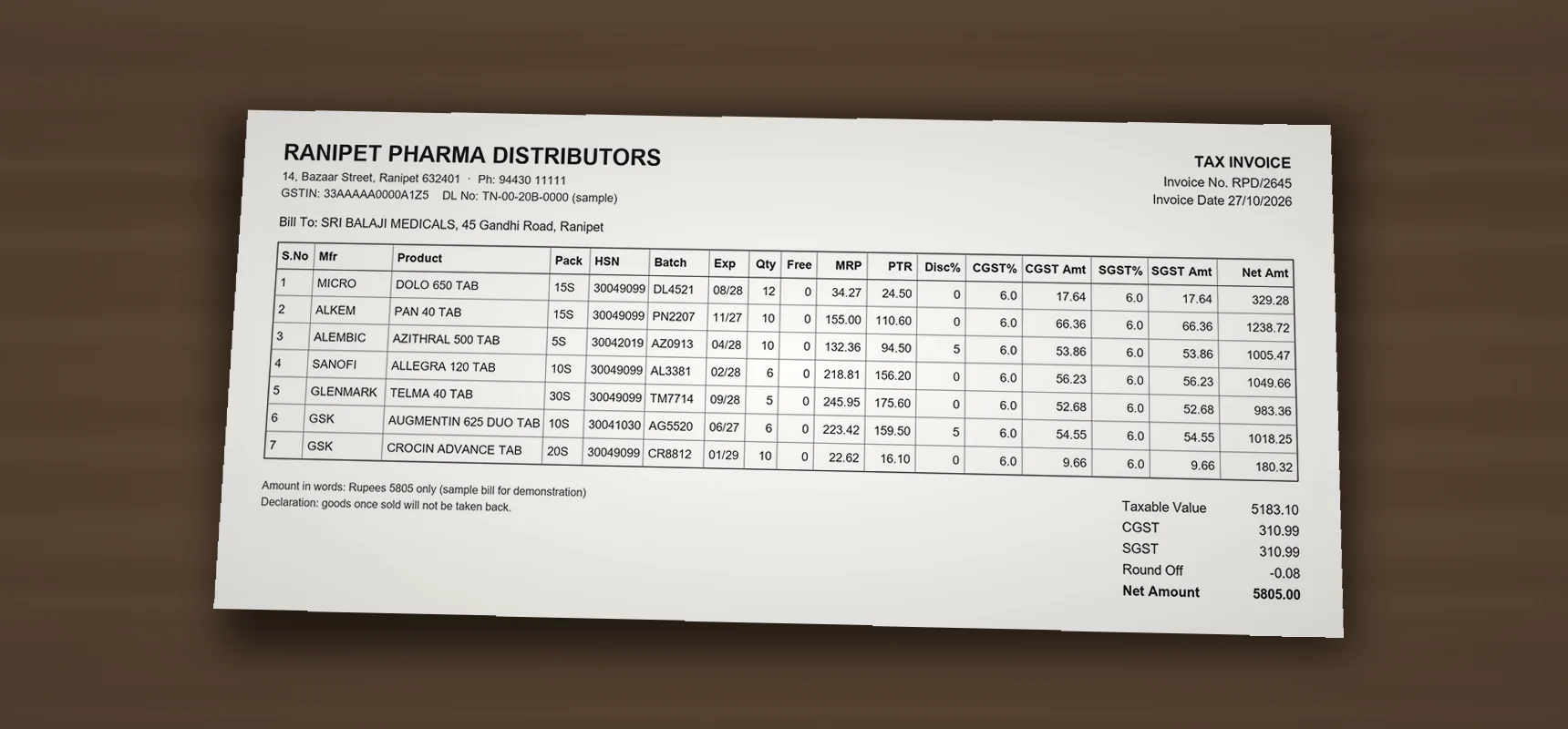 Reading the bill · no internet
- 01
Take a photo of the bill
Use your phone, or open the supplier’s PDF. Every page of one bill, in one go.
- 02
INVENTRA reads every line
Medicine or product, batch, expiry, quantity, free, rate, MRP and GST — read on your own computer. No internet needed, and the bill never leaves your shop.
- 03
Check and save
Lines are matched to your stock. Anything unsure is shown in yellow for you to confirm. Nothing reaches stock until you press save.
Only in INVENTRA Medical
2.5 lakh Indian medicines, ready from day one.
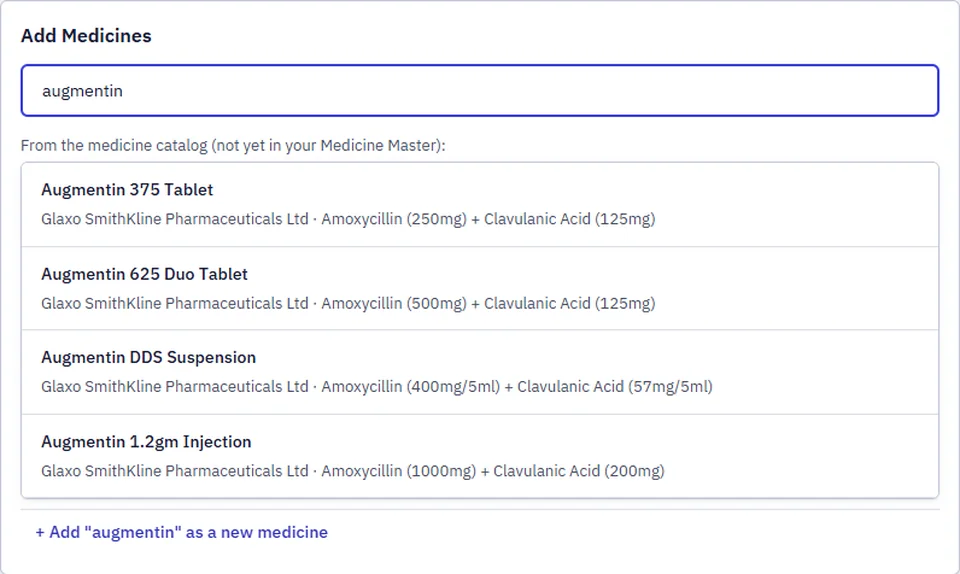
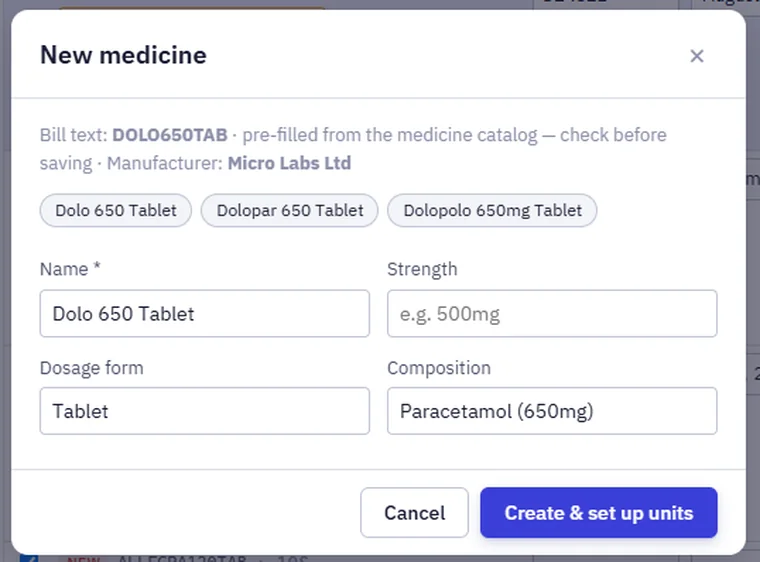
INVENTRA Medical comes with a built-in list of about 2.5 lakh Indian medicines — name, manufacturer, composition and pack size. Type “augmentin” and pick it; no typing medicine details. When a supplier bill has a medicine you have never stocked, it is filled in from the same list.
- Brand, manufacturer and composition filled in
- Strip and tablet units suggested from the pack size
- You still review before anything is saved
Key capabilities
What it covers
The core areas INVENTRA Medical is built to handle.
- 01
Supplier bill from a photo
Photograph the supplier bill (or open its PDF). Every line — medicine, batch, expiry, quantity, free, rate, MRP and GST — is read on your own computer, with no internet. You check and save: up to 90% less time on purchase entry.
- 02
2.5 lakh medicines built in
A built-in list of about 2.5 lakh Indian medicines with manufacturer, composition and pack size. Search and pick instead of typing medicine details.
- 03
POS / Billing
Counter billing for day-to-day pharmacy sales.
- 04
Medicine inventory
Maintain medicine records and stock levels.
- 05
Purchases
Record purchases from suppliers into stock.
- 06
Sales
Keep a record of sales for tracking and reporting.
- 07
Returns
Handle returns as part of the pharmacy workflow.
- 08
Batch management
Track medicines by batch.
- 09
Expiry management
Keep track of medicine expiry dates.
- 10
Stock management
Monitor stock as purchases, sales and returns happen.
- 11
Reports
Reports from your pharmacy’s sales, purchase and stock records.
Use cases
Who it’s for
- 01
Retail pharmacies
Counter billing with medicine stock, batches and expiry managed in the same system.
- 02
Medical shops
Shops moving from manual registers or basic billing to structured pharmacy management.
- 03
Pharmacies preferring local systems
Businesses that want the application and their data on their own computer.
Deployment context
Installed locally, on your system
Deployment
- INVENTRA Medical is installed and operated on the client’s local computer running Windows.
- The application database and business records are stored on that local system.
- Business data entered into INVENTRA Medical belongs to the client.
- A database backup facility can be run from the application’s Backup settings. We recommend keeping a copy away from the main computer.
- Licensing is arranged per business — for example annual or lifetime — as agreed in the licence agreement.
Technology & support
- PostgreSQL database, installed as part of the local deployment.
- Support can include installation and configuration assistance, bug fixing, database troubleshooting, application-related technical support and approved updates.
- New functionality, customised modules or integrations requested for a specific business can be discussed separately.
Product video
See INVENTRA Medical in action
A short tour of INVENTRA Medical using real screens — in English, Hindi or Tamil. For a walkthrough with your own workflow, request a live demo.
INVENTRA Medical · English
Live walkthrough
Want to see it with your own products?
The best way to evaluate INVENTRA Medical is a live walkthrough, where we show the software and discuss how it fits your workflow.
FAQ
Frequently asked questions
Have a question that isn’t covered here? Talk to us directly.
01 Is INVENTRA Medical cloud-based?
No. INVENTRA Medical is installed and operated on your local computer/system, and its database is stored on that system.
02 Who owns the data?
The business data you enter — customers, suppliers, medicines, purchases, sales, stock and reports — belongs to you. MAHTECH SOLUTIONS does not claim ownership of it.
03 How are backups handled?
INVENTRA Medical provides a database backup facility that can be run from the application’s Backup settings. You decide the backup frequency, and we recommend keeping at least one copy in a separate location such as an external drive.
04 What does support include?
Support can include installation and configuration assistance, bug fixing, database troubleshooting, application-related technical support and approved updates. Hardware, Windows and data-recovery work is outside normal software support unless separately agreed.
05 Can features be customised for our pharmacy?
Yes, customised modules, reports or integrations can be discussed. Work requested specifically for your business may be charged separately.
INVENTRA Medical
Interested in INVENTRA Medical? Let’s walk you through it.
Request a demo and we’ll show you the software and discuss how it fits the way your business works.